YouTube will power tutorial videos. We won't embed a fake player or claim the video is already published. Meanwhile, follow the complete text guide below.
Wiring diagram
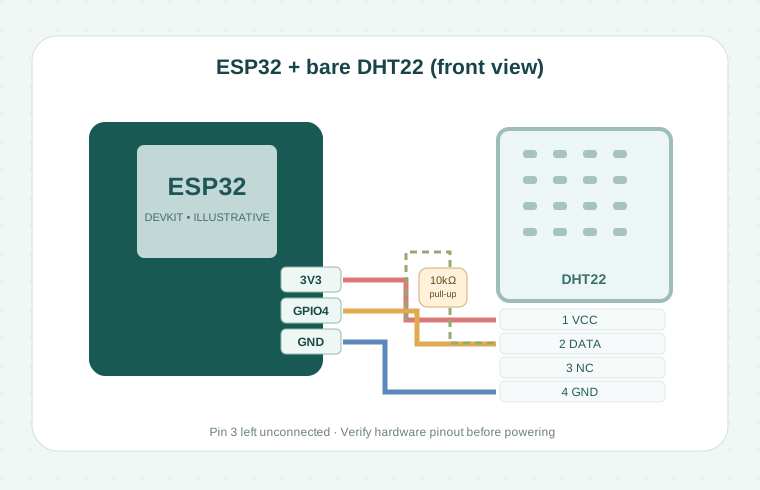
This illustration shows a bare four-pin DHT22 with a 10 kΩ pull-up. Confirm your exact sensor's pinout and the ESP32 board revision.
1. What you will build
A small sensor circuit that prints relative humidity and temperature in the Arduino Serial Monitor. You do not need a screen, cloud account or Wi-Fi for this first experiment.
2. Know your components
Use an ESP32 board with 3.3 V logic and a DHT22 sensor. Check the manufacturer pinout of your exact board. For the illustrated bare DHT22, when viewing the grille from the front with pins downward, pins 1–4 are VCC, DATA, NC and GND.
3. Wiring
With power disconnected: DHT22 VCC → ESP32 3V3; DATA → ESP32 GPIO 4; GND → ESP32 GND. Place a 10 kΩ pull-up between DHT22 DATA and 3V3. The sensor third pin is left unconnected. If using a module with its own pull-up, check its schematic.
4. IDE and dependencies
Select the actual ESP32 board in Arduino IDE. Install “DHT sensor library” and “Adafruit Unified Sensor”. The example sketch imports DHT.h and runs readings every two seconds.
5. Upload and verify
Connect the board by USB, upload the sketch, and open Serial Monitor at 115200 baud. Compare readings against room conditions. If reads fail, double-check the pinout, GPIO choice and pull-up.
6. Safety and review status
This lesson is an educational demonstration; physical hardware verification is still pending. Work only with the low-voltage connections described, disconnect power before rewiring and never connect 5 V signals directly to ESP32 inputs.
Arduino source code
Download the example sketch and open it in Arduino IDE. Dependencies are listed in the comments and guide above.
#include <DHT.h>
#define DHT_PIN 4
#define DHT_TYPE DHT22
DHT dht(DHT_PIN, DHT_TYPE);

void setup() {
  Serial.begin(115200);
  dht.begin();
}

void loop() {
  delay(2000);
  float h = dht.readHumidity();
  float t = dht.readTemperature();
  if (isnan(h) || isnan(t)) return;
  Serial.printf("T: %.1f C  H: %.1f %%\n", t, h);
}